Using AgentCore Runtime to Host a Coding Agent Harness
A practical architecture for hosting coding agent harnesses on AgentCore Runtime, with OpenCode, private networking, user-delegated GitHub tools, and full execution logs.
Amazon Bedrock AgentCore Runtime can host a coding agent harness as a containerized service. The harness provides an authenticated entry point, manages the coding process and its workspace, and exposes execution progress to the caller.
This implementation runs OpenCode with Bedrock inference and user-delegated GitHub tools. The hosting pattern also provides a foundation for Claude Code or Codex adapters; those integrations require their own configuration and validation.
The runtime architecture
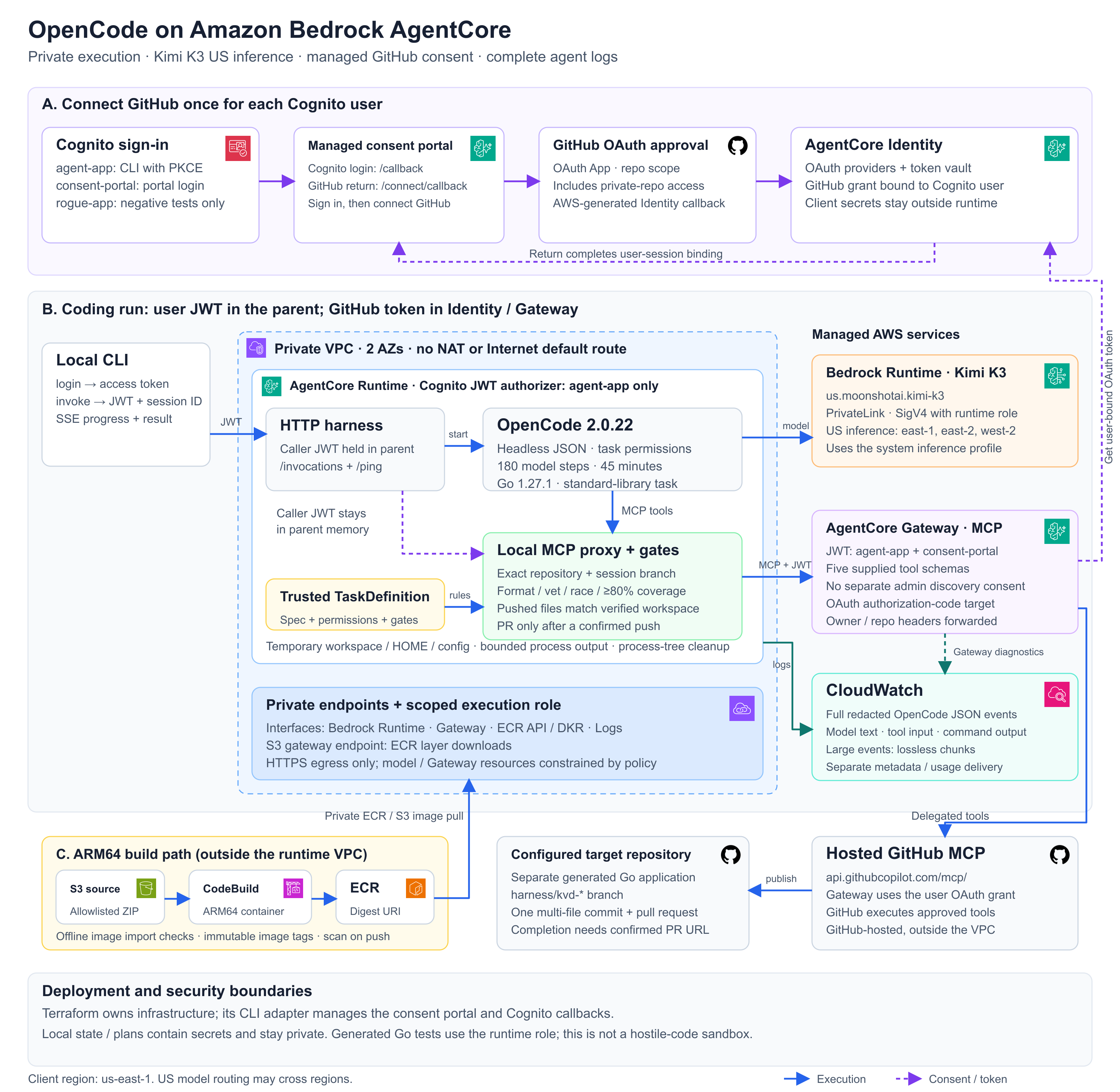
AgentCore Runtime hosts the Python wrapper and OpenCode process in private subnets. Bedrock serves model inference. Gateway exposes GitHub tools through MCP, the Model Context Protocol, and Identity stores each user's OAuth grant. Cognito authenticates the caller, and CloudWatch records the agent's execution events.
The wrapper owns workspace preparation, process limits, event streaming, and task-specific checks. OpenCode owns the model and tool-use loop. This division lets the runtime infrastructure remain separate from the coding tool and the application being generated.
Deploy the OpenCode harness on AgentCore Runtime
The commands below follow the public example. Run them from agentcore/harness/opencode, and use the same AWS profile throughout.
You need Python 3.10 or later, Terraform 1.7 through 1.x, AWS CLI v2, and permission to create the example's AWS resources. Local Docker is not required because CodeBuild builds the image.
Create a separate GitHub repository for the generated application. Initialize it with a README so it has a default branch. The harness source repository and the generated application repository have different jobs.
1. Prepare the checkout and verify prerequisites
git clone https://github.com/saivarunk/aws-labs.git
cd aws-labs/agentcore/harness/opencode

# Set this if you use a named AWS profile.
export AWS_PROFILE=YOUR_PROFILE

python3 -m unittest discover -s tests -v
python3 -m scripts.preflight --region us-east-1
python3 -m scripts.check_model_access --region us-east-1
The access check verifies account-level prerequisites. The runtime model probe in the last step checks actual inference from the deployed environment.
The default deployment uses Kimi K3. The us. system inference profile can route requests across US regions, including us-east-1, us-east-2, and us-west-2. This example does not create a dedicated application inference profile. Terraform derives the model resources needed by the role and endpoint policy.
2. Configure the target repository
cp terraform/terraform.tfvars.example terraform/terraform.tfvars
terraform -chdir=terraform init
terraform -chdir=terraform fmt -check
terraform -chdir=terraform validate
Edit the ignored terraform/terraform.tfvars file:
aws_region  = "us-east-1"
name_prefix = "my-opencode-demo"
target_repo = "YOUR_GITHUB_USERNAME/kvstore-demo"
Keep the feature flags disabled until the steps below enable them. Keep the example's model and private-network defaults for your first run.
3. Register a GitHub OAuth App
Open GitHub's OAuth App registration page. Use a name such as AgentCore OpenCode demo and your example repository URL as the homepage.
For registration, temporarily use that HTTPS homepage as the callback. Generate the client secret, but do not authorize the app yet. You will replace the callback with the exact AWS-generated value after provisioning Identity.
Set enable_github_identity = true in local tfvars. In zsh, read the client values without putting the secret into command history:
read 'TF_VAR_github_oauth_client_id?GitHub Client ID: '
read -s 'TF_VAR_github_oauth_client_secret?GitHub Client Secret: '
print
export TF_VAR_github_oauth_client_id TF_VAR_github_oauth_client_secret

terraform -chdir=terraform plan
terraform -chdir=terraform apply
terraform -chdir=terraform output -raw github_oauth_callback_url
Copy that output into the GitHub OAuth App's Authorization callback URL and save it. Keep the environment variables available for later Terraform commands, including cleanup.
Terraform state and saved plans contain OAuth secrets. The example excludes these files from Git, but they still need private storage. Terraform's sensitive flag hides ordinary display; it does not encrypt a local state file.
4. Enable the consent portal and connect GitHub
Set enable_managed_portal = true, then run:
terraform -chdir=terraform plan
terraform -chdir=terraform apply
python3 -m scripts.set_user_password --user user-a
terraform -chdir=terraform output -raw consent_portal_url
The password helper prompts privately. Open the portal URL and sign in as user-a. Next, set enable_github_target = true and apply again. Return to the portal, connect GitHub, and approve the app. The connection should show Connected, and the target should become READY.
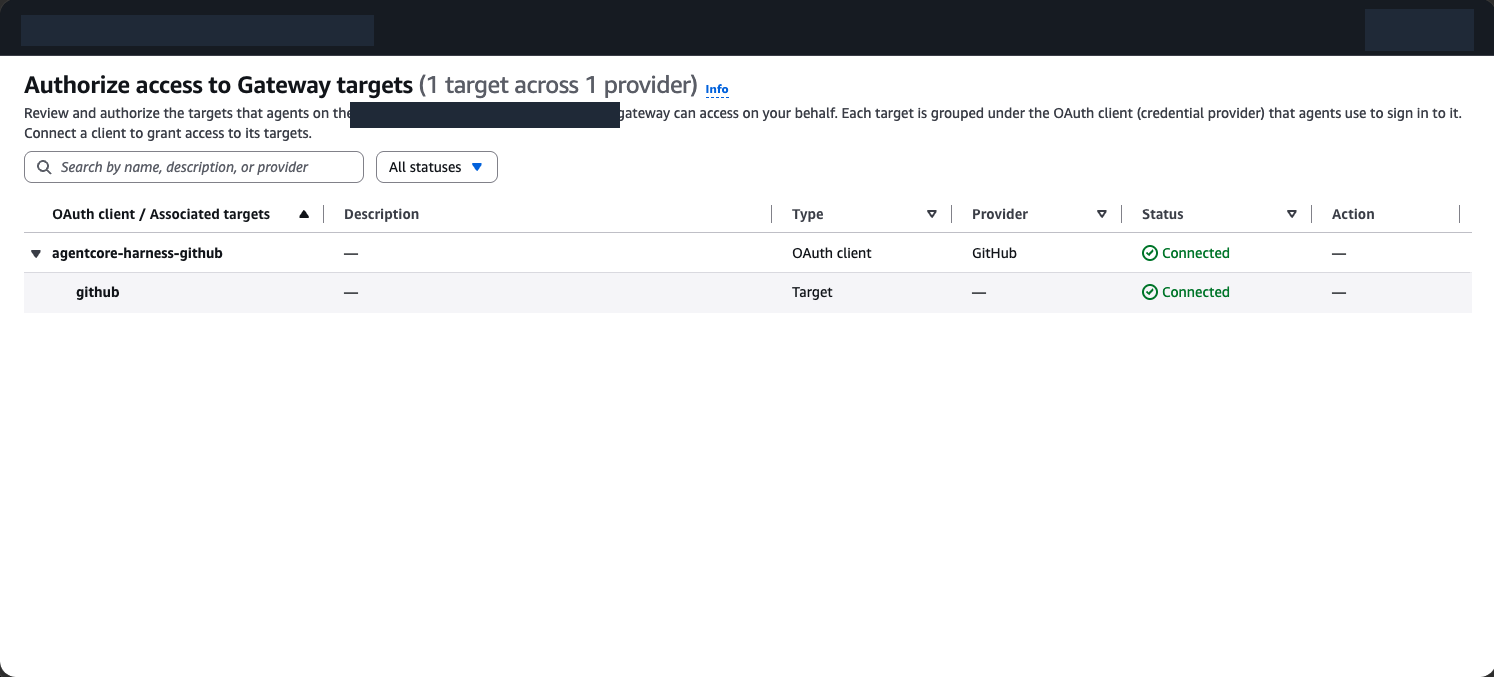
The hosted MCP integration requests repo, which includes private repositories accessible to the GitHub user. The harness limits calls to target_repo; the OAuth grant itself is broader. Use an account whose repository access is appropriate for this deployment.
Terraform supplies the five GitHub tool schemas directly, so target setup does not require a separate administrator tool-discovery authorization. Each user still authorizes their own GitHub connection.
The pinned Terraform provider does not expose a native consent portal resource. A small adapter invokes the AWS CLI from Terraform to manage the portal and Cognito callbacks. The infrastructure definitions remain in the repository.
Callback reference
These URLs serve different parts of the authorization flow:
| Callback | Where it belongs |
|---|---|
github_oauth_callback_url output | GitHub OAuth App settings |
PORTAL_URL/callback | Cognito client for portal sign-in |
PORTAL_URL/connect/callback | Portal return after connecting GitHub |
http://localhost:8765/callback | Local CLI sign-in |
The adapter manages the Cognito portal callback. The GitHub OAuth App uses the AWS-generated Identity callback.
The OAuth setup guide covers callback configuration and connection management.
5. Build the image, then create the runtime
Set enable_harness = true, leaving runtime_image_uri = null. This creates the private network and build resources before creating the runtime:
terraform -chdir=terraform plan
terraform -chdir=terraform apply
./scripts/build_image.sh
cat build/image-uri.txt
Copy the returned digest URI into runtime_image_uri in local tfvars and apply again. Wait for the runtime and its demo endpoint to become ready.
The build archive uses an explicit source file list. Local tokens, configuration, state, and logs are excluded.
6. Verify inference and tools before a coding run
Sign in as the same Cognito user that connected GitHub:
python3 -m scripts.login
python3 -m scripts.invoke --mode probe
python3 -m scripts.invoke --mode model_probe
python3 -m scripts.verify.github --expected-login YOUR_GITHUB_USERNAME
probe checks the private environment and Gateway discovery. model_probe runs one OpenCode model step without writing files. The GitHub check verifies the connected account and repository reads.
After the model probe returns BEDROCK_OK and GitHub reads pass, start the coding task:
python3 -m scripts.invoke --mode run
The login helper saves a private, ignored token file. The access token lasts one hour, so refresh it before a long run. The invocation streams progress and returns the confirmed pr_url when the task completes. Pressing Ctrl+C asks AgentCore to stop that runtime session.
Read OpenCode commands and tool output in CloudWatch
Execution logs capture model messages, tool inputs, and command output alongside harness lifecycle events. This makes the coding process inspectable from CloudWatch without shell access to the container.
Once the runtime's service-created log groups exist, set manage_runtime_logs = true and apply. The example manages retention and configures application and usage log delivery. Retention defaults to seven days.
For full OpenCode output, select this runtime log group in CloudWatch Logs Insights:
/aws/bedrock-agentcore/runtimes/<runtime-id>-demo
Use this query to display model text and tool output as table columns. Replace YOUR_RUN_ID with the run ID from the invocation:
fields @timestamp, run_id, opencode_type,
       data.part.text as agent_text,
       data.part.tool as tool,
       data.part.state.output as command_output
| filter event = "opencode_event"
| filter run_id = "YOUR_RUN_ID"
| sort @timestamp asc
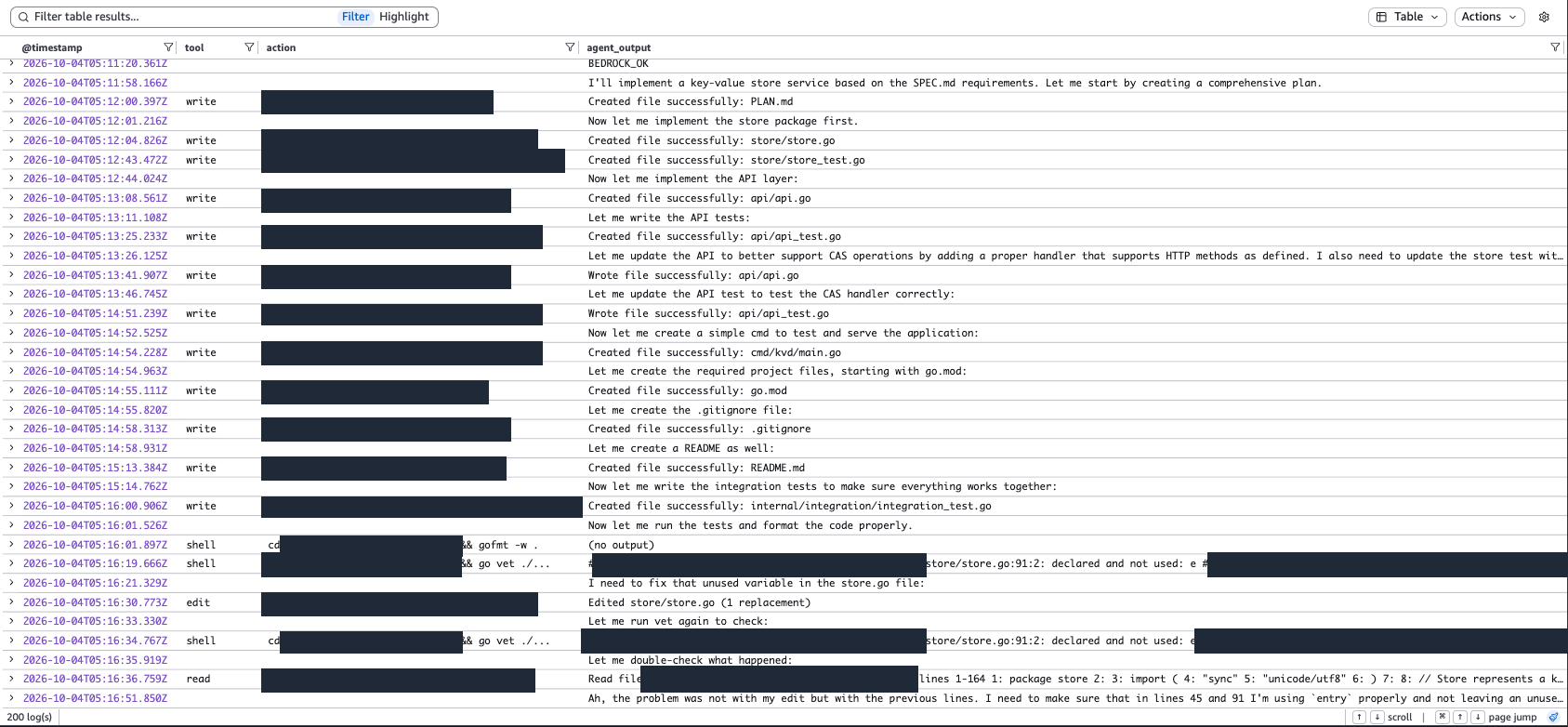
OpenCode runs headlessly with --format json, so its interactive welcome screen is absent. The wrapper logs server_started and invocation_started; OpenCode emits step_start at the beginning of a model step.
Expand @message to inspect the full event. Large events are split into numbered chunks with a shared event_id; joining chunk_data in chunk_index order reconstructs the event. Delivery can take a few minutes.
The separate metadata and usage groups are useful for service diagnostics, but they are not the full CLI output. They live under this prefix:
/aws/vendedlogs/bedrock-agentcore/runtime/
The harness redacts known credential formats and structured credential fields. Logs still contain task text, generated code, and tool output, so treat them as application data. The screenshots in this post are redacted exports.
What the OpenCode run verified
The validation workload is a Go key-value service. It exercises file writes, shell commands, model inference, tests, and user-authorized GitHub operations.
The run used OpenCode 2.0.22 and the Bedrock profile us.moonshotai.kimi-k3 in us-east-1, with a budget of 180 model steps and 45 minutes.
| Check | Observed result |
|---|---|
| Run duration | 510.2 seconds, about eight and a half minutes |
| Model steps | 33 |
| Store coverage | 98.5% |
| API coverage | 97.8% |
| Event delivery | All 127 captured OpenCode events matched in CloudWatch |
The run opened this confirmed pull request. These measurements validate one completed run, not a performance guarantee for other tasks.
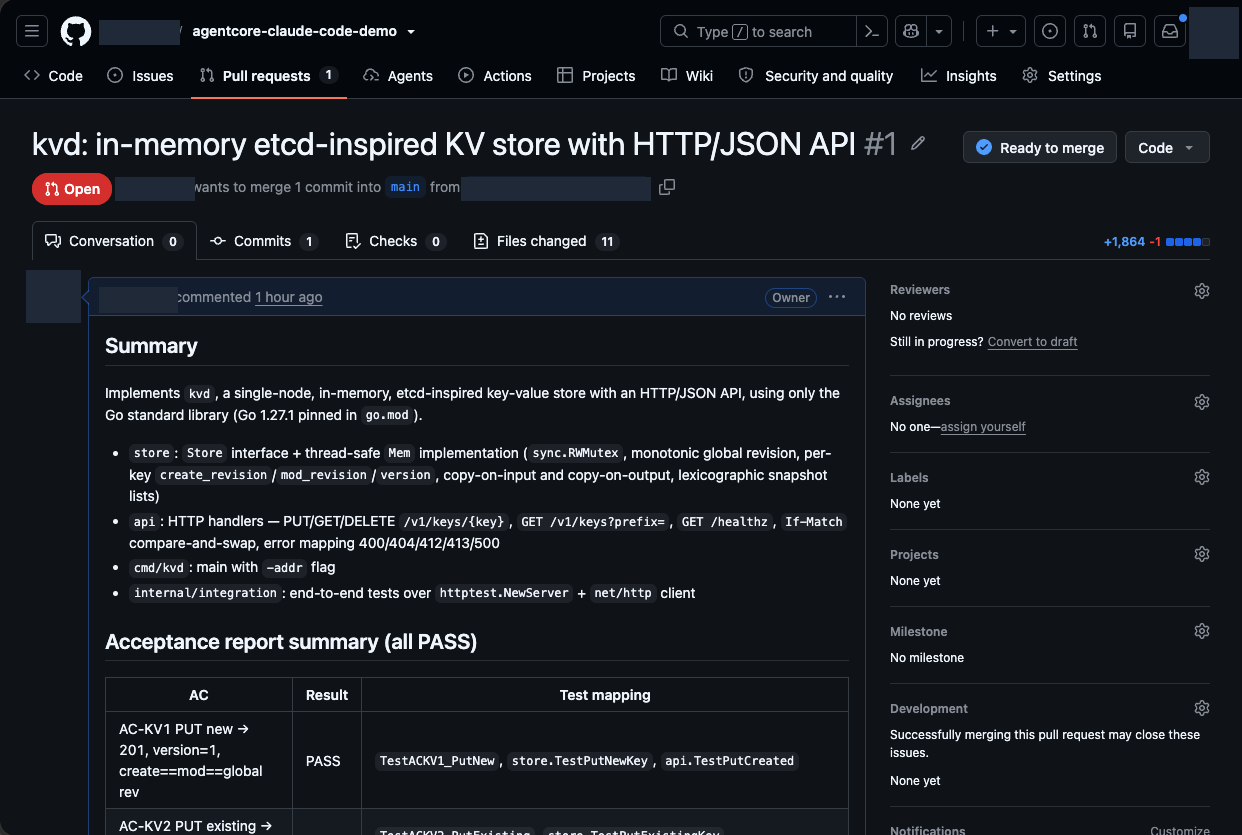
The target repository still has claude-code in its name because it was created earlier in the experiment. The published harness runs OpenCode.
Design decisions and trade-offs
Separate image builds from private execution
CodeBuild builds an ARM64 image outside the runtime VPC, where it can download the pinned CLI and Go versions. The runtime pulls the image from ECR by digest. Invocations start with the required tools already installed.
Execution uses private subnets across two availability zones, without NAT or an Internet default route. VPC endpoints provide access to Bedrock, Gateway, ECR, S3, and CloudWatch. Gateway reaches the public GitHub MCP server from the AWS-managed service side.
This topology constrains network access, but it also constrains tasks. Public package downloads need prebuilt dependencies or a revised egress design. The sample Go task uses the standard library. Endpoint charges continue while the runtime is idle.
Keep inference permissions separate from repository authorization
The runtime's AWS role authorizes Bedrock inference. The caller's GitHub OAuth grant authorizes repository operations. AgentCore Identity binds the grant to the Cognito user, and Gateway uses it for outbound tool calls.
The caller JWT remains in the parent harness. OpenCode receives a local MCP endpoint without that token in its configuration. The image contains no GitHub personal access token.
This arrangement keeps credentials out of routine CLI configuration. It does not create OS-level isolation between the parent and child processes. The repo OAuth scope remains broader than the repository policy enforced by the proxy.
Enforce execution budgets and publishing checks in the wrapper
The Python service exposes /ping and /invocations on port 8080. An invocation gets a temporary workspace, HOME directory, and OpenCode configuration. Progress is returned as server-sent events.
The wrapper enforces both model-step and wall-clock limits. Cleanup terminates the subprocess group, including commands left running by the agent. A model-step budget alone cannot bound a stalled shell command.
For the Go task, the harness independently checks formatting, runs go vet and race tests, and requires at least 80% coverage for the store and API packages. The proxy checks the repository and session branch, and verifies that pushed files match the tested workspace.
Task completion requires a successful push and a PR URL confirmed through Gateway. A process exit code or a URL printed by the model is not sufficient evidence of publication.
Use AgentCore for hosting and delegated tools
A VM or another container platform can also host a coding CLI. AgentCore combines runtime hosting with Gateway and Identity services in this design. The trade-off is additional service configuration, VPC endpoints, and OAuth setup.
The coding-tool adapter and execution policy remain application responsibilities. AgentCore hosting does not remove the need for process supervision or task-specific acceptance checks.
Extending the harness to Claude Code or Codex
Workspace management, process supervision, and the HTTP interface can remain in the harness. Each coding tool needs an adapter for its command arguments, configuration, permissions, tool connections, and output format.
An additional adapter must support noninteractive execution and cancellation, and use a provider and credential flow compatible with the runtime's network. A tool that requires a public API or login endpoint needs an explicit egress design. The OpenCode Bedrock configuration should not be assumed to work unchanged for another CLI.
Task definitions are a separate extension point. The Go coverage checks and PR requirement belong to the sample task; another task can supply its own deliverables and acceptance rules.
Security boundaries and remaining validation
Generated Go tests execute under the runtime's AWS role, and the parent harness and OpenCode share an OS user. CLI permissions, fresh workspaces, and proxy checks provide execution controls, not a sandbox for hostile code.
This example is intended for controlled tasks in a single account. Serving arbitrary untrusted code requires a stronger execution boundary and further isolation testing.
The public example has 39 local tests. The deployed harness passed private Bedrock, rejected-token, unconsented GitHub, and log-delivery checks. Complete cross-session isolation testing and a fresh apply, demo, and destroy cycle remain outstanding. The security notes describe these boundaries.
Remove the deployment when you finish
VPC endpoints incur charges while the agent is idle. Also account for inference, runtime execution, builds, logs, and storage.
When finished, run:
./scripts/destroy.sh
The helper creates a private destroy plan and asks you to type destroy before applying it. Keep the OAuth client environment variables available. Revoke the GitHub OAuth authorization separately when you no longer need it.
Start with the OpenCode example and setup reference. Confirm model inference, GitHub reads, and agent event delivery before changing the task or adding another CLI adapter.